 ATRIUM
First understand the discovery or conversation context.
ATRIUM / Messaging
From a first sentence to an ongoing connection.
Discovery is a beginning. Messaging provides the communication layer for discussing details and continuing connections through direct, group and community contexts.
Working MVP · Preparing for controlled beta
CONTROL THE SCENARIO
From a beginning to the next step.
Illustrative flow · No live users or transactions.
11 sections in this guide
01
Knowing why you are talking matters.
A conversation beginning with a Ping, a community discussion and an event question create different expectations. Losing the original context makes it harder to understand who is communicating and why. Atrium's communication layer is considered alongside discovery modules rather than as an isolated inbox.
A shared interest or clear purpose can help begin communication without removing boundaries. Messaging is not an automatic entitlement following discovery. People need to understand what they share and retain control over conversations they do not wish to continue.
02
Direct conversations provide space for details.
Direct communication can support activity details, availability or an ongoing connection. Sharing information in a conversation is different from appearing in discovery. Users should consider whether an address, phone number or schedule is necessary; proximity does not require automatic disclosure.
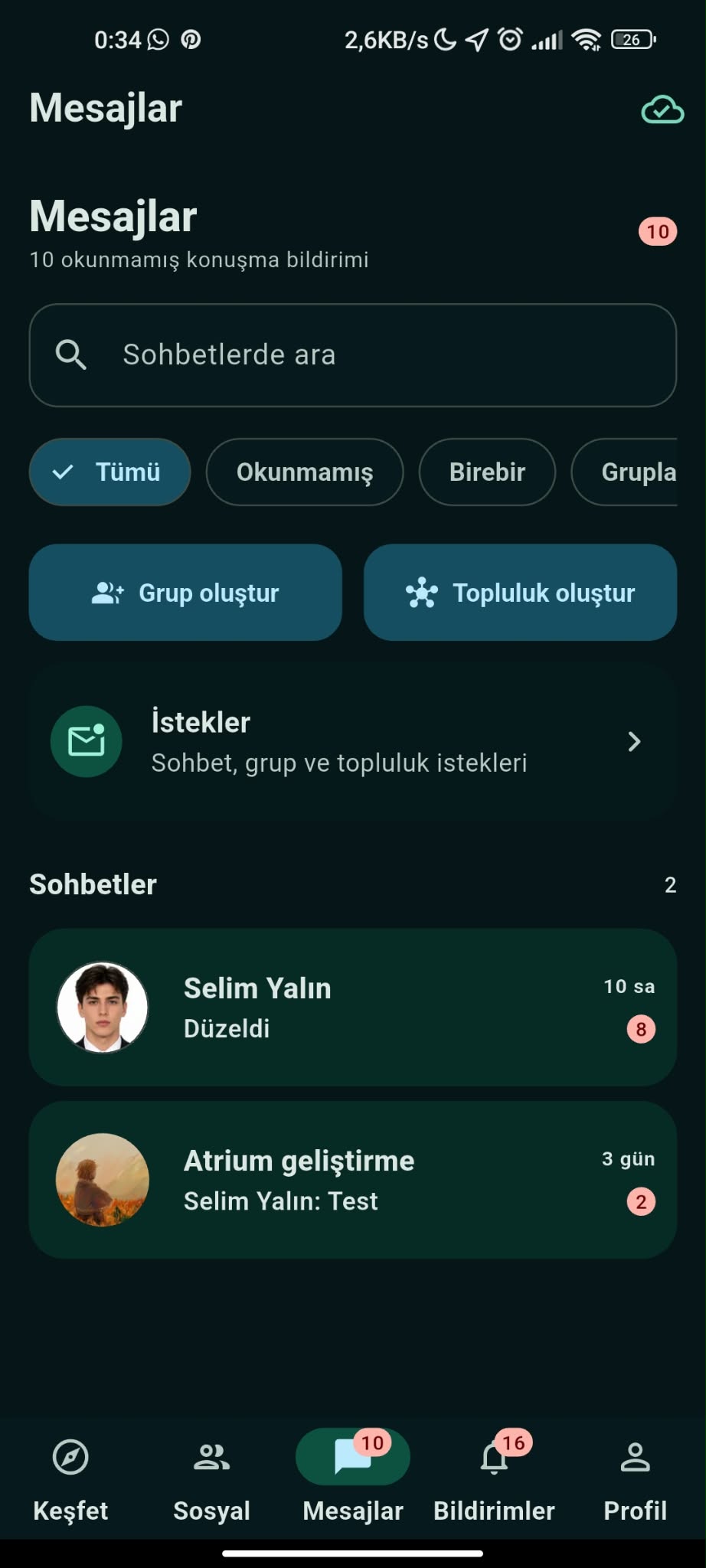
The messaging experience brings conversations together and lets you open a conversation and explore its history. The capture introduces the interface; the website does not send messages to application users. The contact form remains a separate support and collaboration channel.
03
Text, media and a message's lifecycle.
Source includes text and media messages, media access, editing, removal for oneself or everyone, and reactions. These indicate a richer lifecycle than a single text box. This page does not promise unverified file limits or support for every media type on every device.
Removing a message from one's own view is different from removing it for others. Media sharing also needs content and access controls. Understanding sharing options helps you make a more informed decision before sending content.
04
Groups and communities carry shared context.
Group conversations need a clear reason for participation. Community membership, room participation and direct communication create different relationships. Room chat after acceptance illustrates this distinction. The message screen does not replace membership and authorization rules.
People should understand who can see information in a shared conversation. Joining a community should not expose every private area. Server-side access controls remain necessary; the product does not promise unrestricted or unauthenticated chat.
05
Managing a conversation supports personal control.
The repository includes muting, pinning, restricting, archiving, blocking, listing blocked users and unblocking. These controls serve different needs. Reducing notifications and ending contact are not interchangeable, and an interface should explain their consequences.
The ability to stop matters as much as continuing communication. Exact blocking effects in every context require separate server validation. Atrium Trust places these controls alongside location, visibility and meeting guidance.
06
Delivered, read and answered are different.
Source includes marking delivery and reading. These states can explain technical progress without obligating a reply. Delivery and social response differ; a delivered message is not proof of a connection or meeting.
Connectivity, retries and state changes require real application tests. This website describes source capabilities and shows captures without claiming device-to-device delivery, offline behaviour or multi-user access tests have passed.
07
Choose the right continuation after discovery.
A coffee intention may need a short direct conversation; an activity may need a community context; a digital topic may suit Rooms. Communication should preserve these differences so people understand the context and what they are agreeing to.
Explore the real MVP captures and related module guides to understand the experience. Contact is available for technical contributions or a controlled pilot. This page explains product decisions and boundaries without creating accounts or connecting application users.
08
Different tools for organizing an inbox.
Pinning supports finding a conversation, muting notification preferences and archiving inbox organization. Restricting and blocking serve different boundaries. These are separate operations in the MVP and should not appear interchangeable. Managing conversations supports personal control.
Reducing notifications in an active group differs from stopping unwanted direct contact. Appropriate tools should reflect the person's purpose. Exact behaviour across devices needs application validation; the guide explains the decisions.
09
Sharing an image is also a disclosure decision.
The message model distinguishes text, images, video and GIFs. Visual content can reveal addresses, documents or other people's information just as text can. A shared-interest conversation does not require unnecessary personal disclosure; useful communication and privacy choices belong together.
Editing and removal tools do not replace considering disclosure before sending. Removal from your own view differs from removal for everyone, and the product does not promise deletion of every external copy. Trust guidance explains these boundaries.
10
Reactions and status information add context.
The model defines heart, laugh, wow, sad, like and fire reactions. They can support brief responses, while their meaning remains contextual. Small interactions should not be interpreted as proof of strong relationships or physical participation.
Delivery and reading states provide technical context without establishing availability or willingness to reply. Explaining this avoids automatic assumptions about people. Conversation value cannot be reduced to message counts.
11
A conversation continuing after an activity.
People meeting through a community activity may wish to continue discussing an interest. Group announcements and mutually chosen direct conversation are different spaces. Membership should not imply universal permission for private contact; clear boundaries make the relationship understandable.
The conversation might consider another event, review a venue or remain digital. This illustrative example explains continuations after discovery rather than claiming a real user story. Learning what is useful matters more than maximizing messages.
ABOUT THIS MODULE
A few useful answers.
Can I message an application user here?
No. This is the product website and collaboration channel, not an application chat client.
Are voice and video calls supported?
Voice and video calls were not verified in this review and are not presented as current scope.
THE NEXT STEP
Be part of the life around you.
Start a connectionWorking MVP · Preparing for controlled beta · Contact us about participation and collaboration.